For most of the modern languages, the development workflow is centered on local environments linked to a project where you have all your dependencies isolated from the rest of the system.
LabVIEW until the current days does not have this feature, mainly because is not a modern language and also because the modern software engineering approaches have been neglected by NI, vendor and responsible for development of LabVIEW. However, we can see things have been changing, and there has been a small but shy effort to make development in G a bit more smoothier, effort mostly coming from the Developers Community, but also from NI (LV2024 with back save feature).
As LabVIEW does not have the feature of local dependencies or virtual environments, a initiative a few years ago from JKI showed some Proof of Concepts of this possibility. This project has however never reached a usable point where you can benefit from virtual environments, as this feature has not been yet implemented, this has been the promise for more than 3 years, at least.
Most of us, when not satisfied by the combo, VIPM and NIPM, have searched alternatives to fulfill different use cases and to overcome the flaws and bugs with both of the products.
I myself a few years ago started using this generic package manager in some of the projects with some success, others have used Conan, Nuget, and so on. Each with their own set of advantages and disadvantages but never a fully featured virtual environment (with palletes, examples, quick drop plugins, etc..).
Some have been using VMs for this, but I can tell you something. The only reason we are using VMs or other alternatives is because the Package Management for LabVIEW is insufficient or precarious. Some may say inexistent, but maybe that is too harsh.
The Rise of the LVAddons
A few years ago a new feature emerged in LabVIEW, called LVAddons. This feature is used for installing VIs that can be used across any LabVIEW version, and the main use today is to decouple Drivers from the LabVIEW Version allowing different versions of LabVIEW to use the same set of drivers.
At some point in time, I was looking at this feature and seeing how it worked, and in fact, it is something that allows to use entirely NIPM for installing dependent libraries and managing packages, instead of using VIPM for some of them. But that is a different story.
Only in this year in 2024, a undocumented feature was presented in GDevCon NA, by Greg Richardson. See the presentation here. The feature in question was the usage of additional/custom locations for LVAddons, and voilá, we have the missing piece for our LabVIEW Virtual Environment.
To what really matters…
How the LVAddons can help us enabling virtual environments? Let’s get to the examples. In this example, I used a classical example of chained dependency, where one project depends on the other that depends on another one.
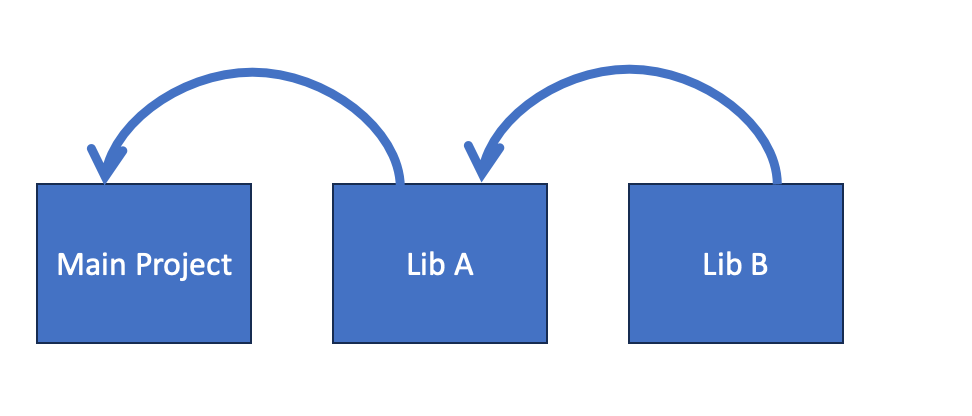
For managing the dependencies I used Nuget, which provides the dependency solver, and easy way to pack LabVIEW files as it is a zip file. Also it allows to point a destination folder in the .nuspec file and when installing it allows you to install it locally in a chosen folder (I could have chose any other).
If you want to look at the code, you can follow the link below for the three projects:
https://gitlab.com/felipe_public/felipe-kb-blog/labview-virtual-environment-example
The LVAddons feature allows you to overlay all the content of the LabVIEW folder, including vi.lib, examples, plugins, etcc.. This means every project can have their own set of VIs, plugins, and palletes.
For testing it, I created a script in bash to call LabVIEW. The script does in short the following things:
- Install the dependencies locally (I choose a folder called .lvvenv).
- Get the LabVIEW executable path
- Copy the LabVIEW.ini to a temporary location.
- Add the current .lvvenv folder to the temporary LabVIEW.ini in the key “
LVAddons.CustomLocation“ - Add to allow multiple instances to the temporary LabVIEW.ini.
- Launch LabVIEW with the temporary ini and the project file.
There it is, and then we have our virtual environments, fully featured. I know, it is far from being a production code, but you can imagine that a tool that will be built should have some similar steps.
Here is a side by side picture of the project using the Virtual Environment and the other running on bare LabVIEW.
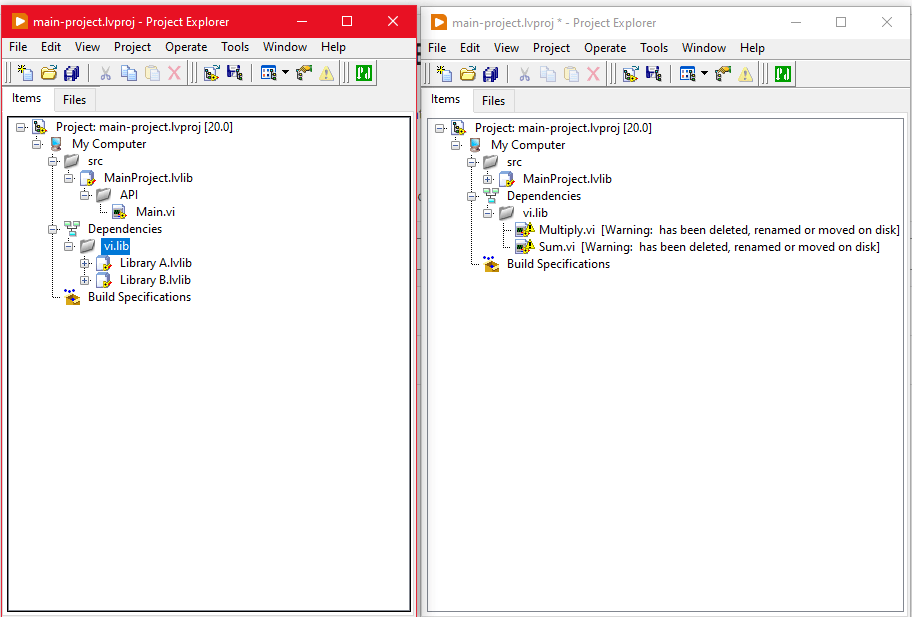
There we can see that even though the files are in the project folder, they are also considered to be inside vi.lib.
Final Remarks and Caveats
Even though this is a proof of concept, it is usable and can be beneficial for someone who is willing to experiment more. We hope that new tools that can benefit from this feature will emerge, and we can have a more rich ecosystem with tools to help and improve our development workflows.
Hopefully NI will follow along and publish a documentation about this feature and to what extent we could use it without problems, with all the minors problems and known issues. One caveat I noticed was the precedence of the main vi.lib over any other vi.lib. This means you can’t have a package installed globally and locally, you can, but only the global will work, which can be a problem in some cases. I couldn’t test about possible conflicts between files (same name) in the local vi.lib, and so on. All those minor things that need a good documentation.
If this interests you or you are curious about something I did, let me know and send me a message, so we can talk.
Until the next one.
 Felipe's Thoughts
Nice work! Have NI published anything since this?
LikeLike
Hi, thanks.
There is a new document from NI on LVAddons but I don’t see any updates on Virtual Environments.
You can check it here:
https://github.com/ni/open-source/discussions/2
LikeLike